SPRAIA on Android: the app is here (and we need testers)
The SPRAIA app now runs on Android: photo identification, health scan, diagnosis and watering reminders. See the screens — and how to become a tester.
By SPRAIA editorial team · Method: botanical sources, field feedback and editorial validation
For months we have been talking about SPRAIA in the future tense. Today we can finally use the present tense: the Android app is finished and running on real phones, with real plants. Not a mockup, not a demo prototype — the complete app, the one we want to open to everyone.
Before that opening, one thing is still missing: a few more testers. If you have an Android phone, plants at home and the willingness to tell us frankly what annoys you, the rest of this article is for you. And for those waiting on iPhone: the iOS version is nearly finished, more on that below.
What SPRAIA looks like on Android
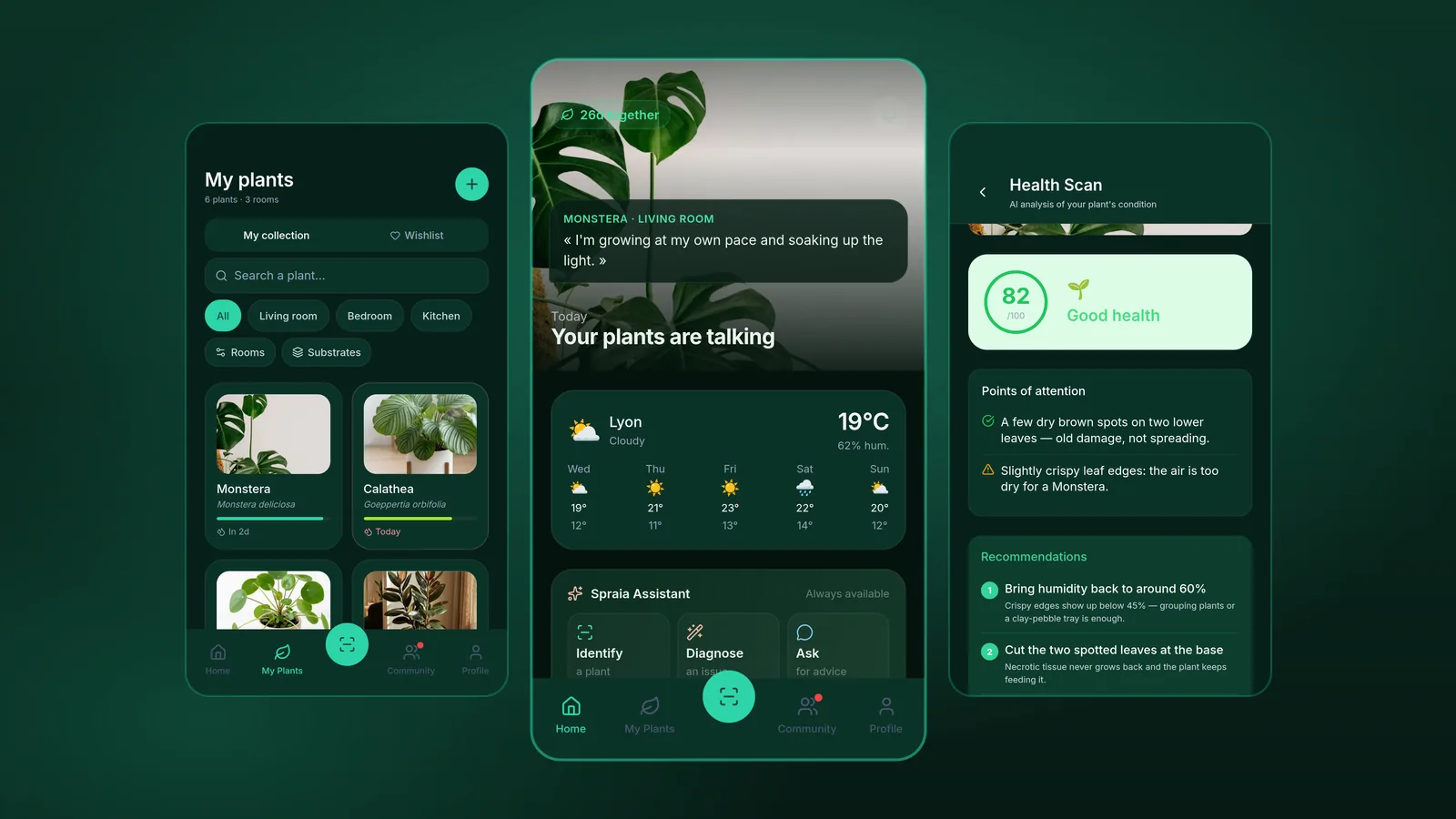
Rather than describing the app, we may as well show it. These are the real screens of the Android version, captured on a device, in their display language.
The screens of the Android app, captured on a phone. The data shown belongs to a demo account.
-
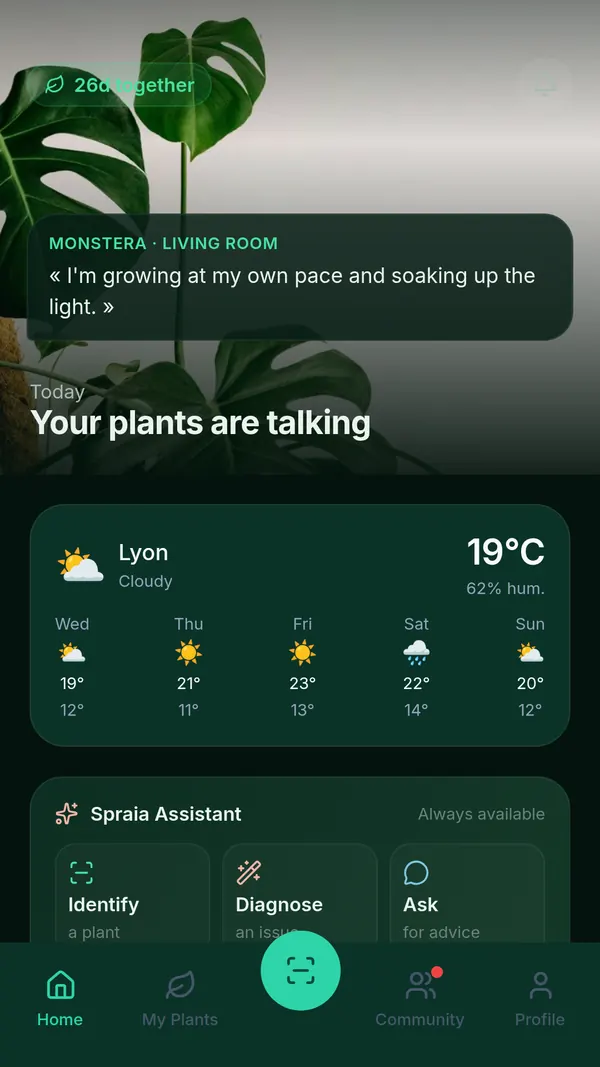
Home: today’s word from one of your plants, your local weather and three actions within thumb reach. -
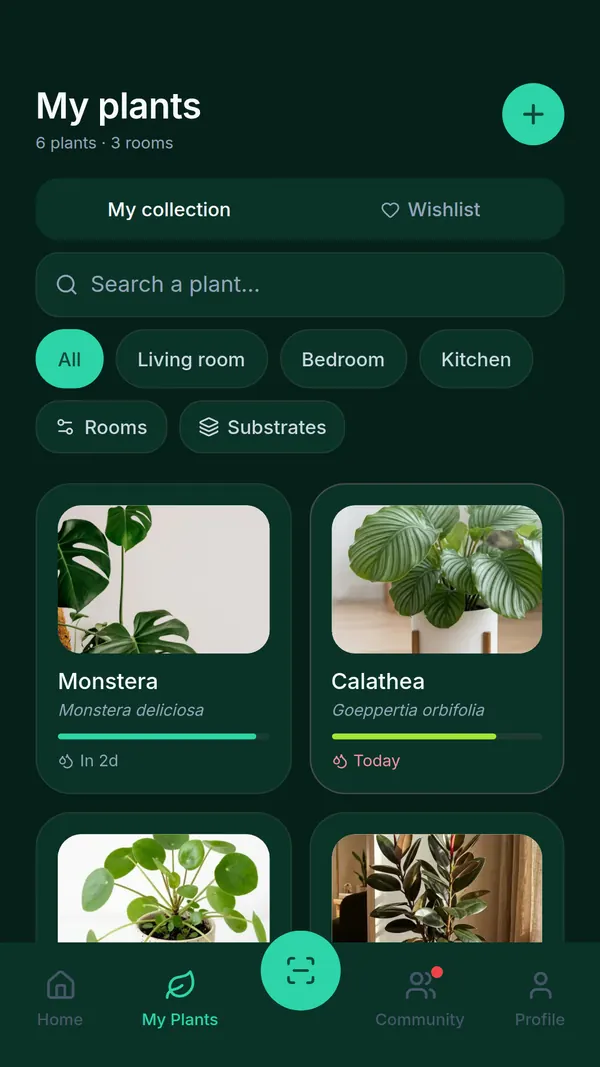
My plants: your collection sorted by room, with the next watering visible on every card. -
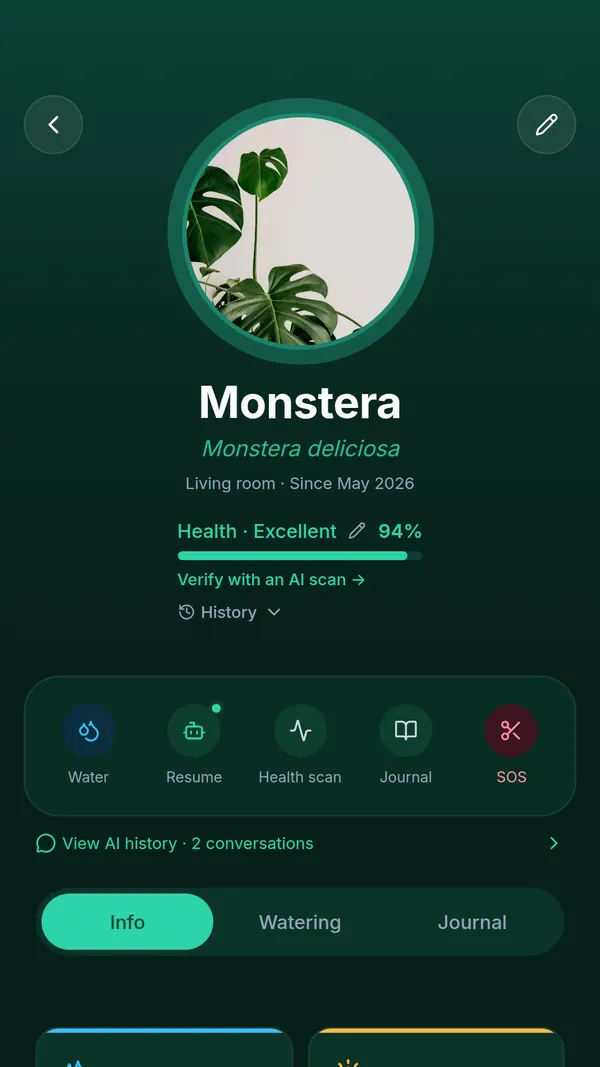
The plant profile: health score, quick actions and Info, Watering, Journal tabs. -
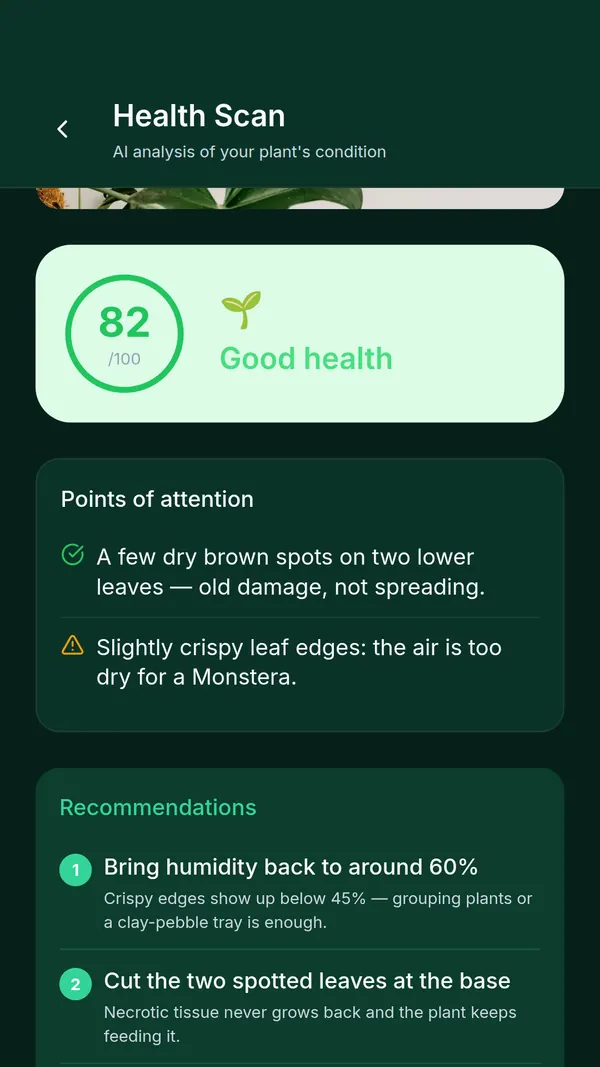
The health scan: a score out of 100, the warning signs and an action plan ranked by priority. -
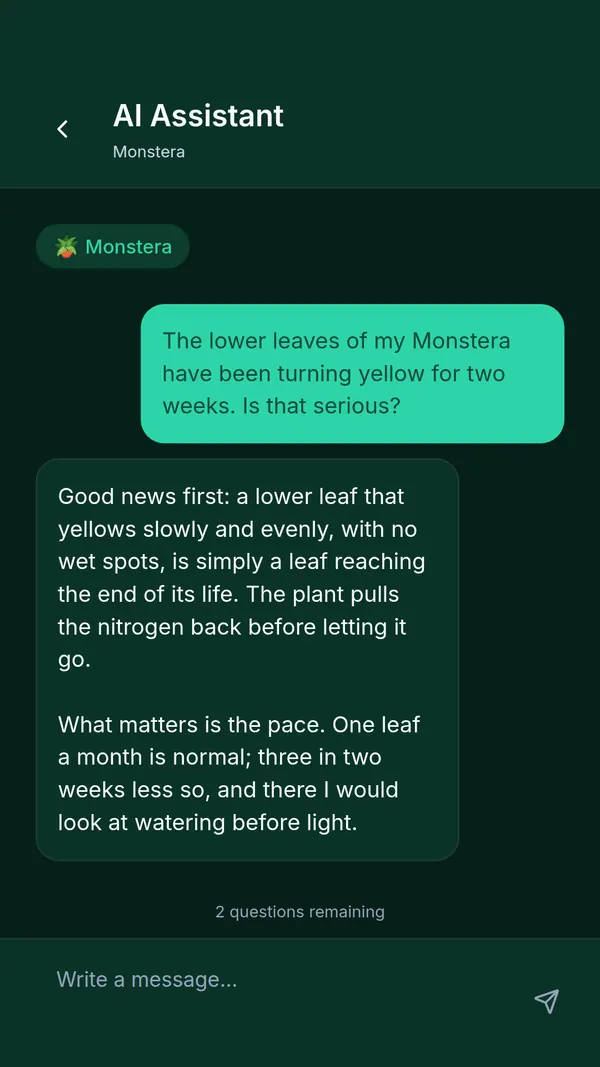
The assistant: a question about one specific plant, an answer that knows its context. -
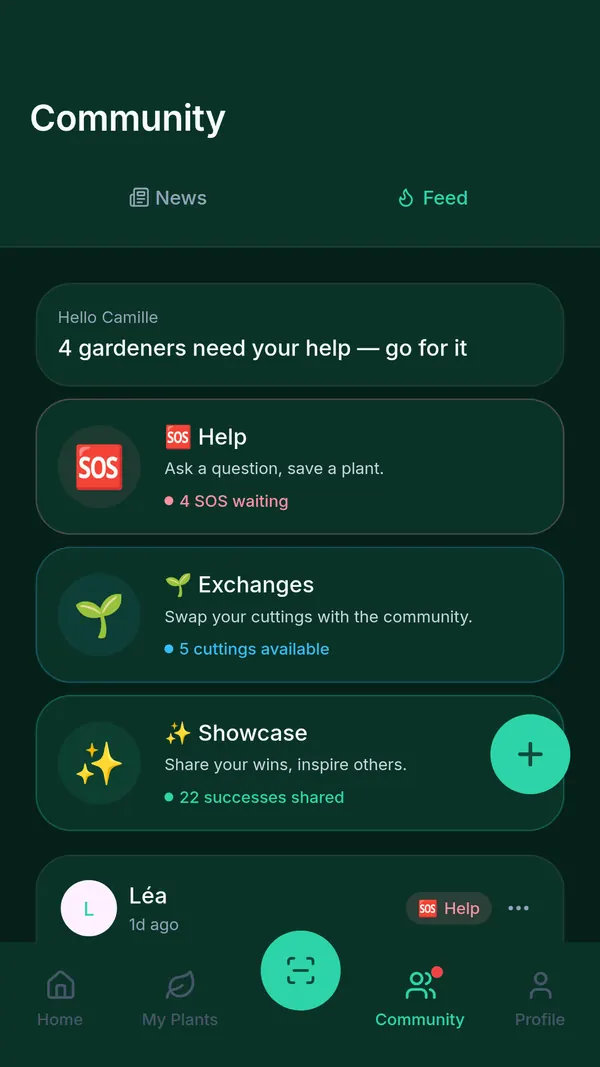
The community: ask for help, swap cuttings, share your wins. -
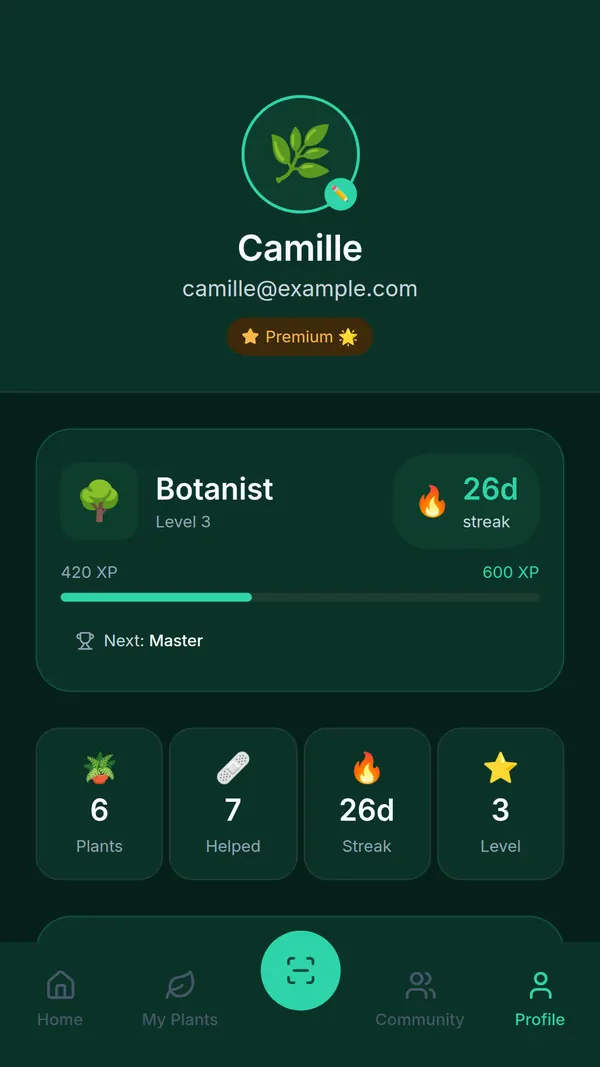
The profile: your level, your streak of consecutive days and your care statistics.
Identifying a plant from a photo
This is the front door. You bring home a plant with no label, you photograph it, the app gives you its species — and its cultivar when that is possible. More importantly, it moves straight on to what actually matters: the plant’s real needs in light, water, substrate and temperature.
If the topic interests you, we covered the method and its limits in our guide on how to identify a plant in 30 seconds.
Knowing whether it is doing well, instead of guessing
The health scan builds an assessment from a photo: a score out of 100, points to watch, and above all a history. That last part changes everything. A plant at 82/100 is not good news in itself; a plant that climbed from 71 to 82 in three weeks is.
In the screenshot above, the analysis separates two things the naked eye tends to merge: dry brown spots that have already healed (old damage, nothing to do) and slightly crispy leaf edges (air too dry, worth fixing). That nuance is exactly what separates caring for a plant from treating it with remedies it never needed.
Understanding what is wrong
Yellow leaves, brown spots, stalled growth, roots that smell bad? The SOS diagnosis starts from the photographed symptom, suggests a likely cause and a step-by-step action plan. Yellow leaves are by far the most common case — and the most misread: seven possible causes, one of which is perfectly normal.
Never missing a watering again
Every plant has its own rhythm, and that rhythm depends on the species, the room, the substrate and the exposure. SPRAIA works out the right moment, then reminds you. Reminders adjust to your city’s weather: no reflex watering after a rainy week, extra vigilance during a heatwave.
If you want to understand the logic before delegating it, our guide on when and how to water your plants explains the method the app applies.
Measuring light with the phone’s sensor
“Is this corner of the living room bright enough for a Calathea?” The app uses your Android’s light sensor to measure actual illuminance and compare it with what the species needs. It is often the answer to problems people blame on watering. Our complete guide to indoor plant light explains why the human eye is a very poor light meter.
Keeping a memory of every plant
Waterings, repottings, photos, notes: the care journal keeps the history of each plant. It is the feature we talk about least and the one that becomes most valuable over time. After a few months it turns “my plant looks tired” into “it has dropped two leaves since the March repotting, right after it changed rooms”. That is the difference between a hunch and a diagnosis.
Alongside the journal, the collection is organised by room, tracks the substrates you use and includes a wishlist — useful once you start spotting plants faster than you can house them.
Not being alone with a declining plant
The Community tab exists because no artificial intelligence replaces someone who has already saved the same plant you are struggling with. It is split into three sections: Help for an urgent question about a plant in trouble, Swaps to pass cuttings and offsets between growers, Wins to share a reflowering or a plant rescued just in time.
It is also the best place for the cases AI leaves open: a rare species, a poorly documented cultivar, an ambiguous symptom.
Why we are still looking for testers
The app is finished, but “finished” does not mean “proven”. Our internal testing covers a handful of devices and a handful of collections. The real world is something else: phones from every brand, jungles of forty plants, photos taken at 10 pm under a yellow bulb, plant names with emoji in them.
We are not looking for technical profiles. We are looking for people who own plants, will use the app normally, and will then tell us what got on their nerves.
What we actually ask of you
- Install the app on your Android phone and use it as you would any other app: add your plants, run a scan, act on the reminders.
- Use it over time, not for ten minutes on day one. It takes two or three weeks to see whether the reminders land at the right moment and whether the health tracking makes sense.
- Tell us what does not work: a confusing screen, a badly chosen word, a diagnosis that misses the mark, a bug. Negative feedback is the most useful kind.
What you get out of it
Full access to the app before it opens, real influence over the decisions still on the table, and the experience of seeing your remarks land in a build a few days later. Beginners and collectors both interest us — they never trip over the same things.
How to apply
Sign up through the form at the bottom of the home page and we will send you the installation instructions. If you would rather write to us, the contact page works just as well — tell us which phone you use and how many plants you keep at home.
What about the iPhone version?
It is the question we get most. The iOS version is nearly finished. It shares the same core as the Android version: same screens, same features, same data. What remains is platform-specific polish and the App Store review process, which is longer and more formal than on the Android side.
Our plan: an iOS release shortly, right after the Android opening. In practice, if you are on iPhone, the best thing to do today is to join the same list: it is the one we will notify first, and it will also serve to recruit iOS testers when that testing phase starts.
Free, Premium: what is included
The free version is not a demo crippled down to three screens. It lets you keep your collection, receive watering reminders, maintain your care journal and identify plants, with a monthly quota of scans, diagnoses and assistant conversations.
The Premium subscription lifts those quotas: unlimited identifications, health scans, diagnoses and conversations. One-off credit packs also exist, for anyone who would rather pay per use than subscribe. Premium comes with a free 7-day trial, cancellable at any time before it ends from your Google Play account.
During the testing phase, testers get the complete app: the point is for you to judge the whole product, not an amputated version.
What SPRAIA does not do yet
Better to be clear about the limits — they are part of the product.
- Connected sensors are not here yet. Soil moisture sensor integration is announced and planned, not shipped. Today, light measurement goes through the phone’s sensor; the rest relies on your observations and your photos. If the subject interests you, our soil moisture sensor comparison covers what exists in the meantime.
- Identification is not infallible. It is excellent on species commonly kept indoors, shakier on rare cultivars and young specimens whose distinctive features have not appeared yet. The app shows its confidence level and offers several hypotheses rather than a single answer — that is deliberate.
- A diagnosis remains a hypothesis. A photo shows neither the roots, nor the substrate, nor what you did last week. The SOS diagnosis points you somewhere; it does not decide for you.
This list will change, and that is exactly why we need testers: they are the ones who will tell us which gap genuinely gets in the way day to day, and which one does not matter at all.
Your photos, your data
A word on a subject that matters, especially for an app that asks you to photograph your home.
- Hosted in the European Union. Your photos and your data stay there.
- Full export. You can retrieve your entire account whenever you want.
- Real deletion. From the app or from our site, without having to write to customer support.
And a warning we would rather put in writing: SPRAIA’s analyses are produced by artificial intelligence and botanical databases. They are provided for information only and do not replace the advice of a professional — a botanist, a landscaper or a nursery. An app that issues diagnoses should say clearly what it is not.
What happens next
The testing phase ends, the Android opening follows, the iOS version comes right behind. In the meantime the blog carries on: if you are starting out with houseplants, our selection of the best plants for beginners is still the best place to start before building your first collection in the app.
Thank you to everyone who has been reading us since the beginning. We built this app because we needed it ourselves. What remains is to check that it genuinely helps you — and only you can tell us that.
Frequently asked questions about the SPRAIA app for Android
The questions that come up most since the testing phase was announced.
- The Android app is finished and currently in closed testing: it is distributed to a group of testers before opening to the public. To get access right now, sign up for the beta list on spraia.app. The public opening will follow the end of this testing phase.
- The iOS version is nearly finished. It shares the same core as the Android version: same screens and same features. What remains is platform-specific polish and the App Store review process, which is longer than on the Android side. The release is planned shortly, right after the Android opening.
- Sign up with your email address through the form on the spraia.app home page, or write to us from the contact page, stating your phone model and how many plants you keep. No technical skill is required: we are looking for people who own plants and will use the app normally for two or three weeks.
- Yes. The free version lets you manage your collection, receive watering reminders, keep a care journal and identify plants, with a monthly quota of scans, diagnoses and assistant conversations. The Premium subscription lifts those quotas and comes with a free 7-day trial. One-off credit packs are also available.
- The app is available in French, English and Spanish. The interface follows the phone language, and both species profiles and assistant advice are produced in the selected language.
- Photos and account data are hosted in the European Union. The entire account can be exported at any time, and deleted from the app or from the website, without going through customer support.